


Our Knowledge Base Has Moved
The New Page landing page for the Knowledge Base is https://product.korbyt.com/help
The new version of this specific article can be found at: https://product.korbyt.com/help/articles/8935849-how-to-reset-edid-on-ariesleo-players
Please update any of your bookmarks to the new Knowledge Base
For assistance on using the new Knowledge Base, we have a Welcome to the New Korbyt Knowledge Base guide
The new Korbyt Product Page also has sections for submitting feedback on system improvements, a view of our Roadmap of upcoming enhancements, and a change log of all updates.

Resetting the EDID on the Leo and Aries players resetting the Video and Audio outputs.
To Reset EDID on these two players, do the following:
- Insert a paper clip into the small hole.
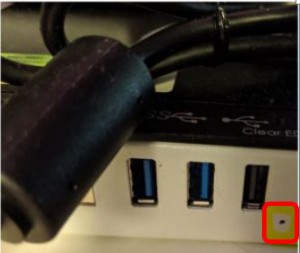
- Press lightly.
- The monitor will go black for a second.
- Make sure to hold down the EDID clear button for 3 seconds. A quick tap does not always completely clear the EDID information.
- The EDID will reset.
