


Our Knowledge Base Has Moved
The New Page landing page for the Knowledge Base is https://product.korbyt.com/help
The new version of this specific article can be found at: https://product.korbyt.com/help/articles/3617444-player-groups-and-access-permissions#fcob7wmlpq2
Please update any of your bookmarks to the new Knowledge Base
For assistance on using the new Knowledge Base, we have a Welcome to the New Korbyt Knowledge Base guide
The new Korbyt Product Page also has sections for submitting feedback on system improvements, a view of our Roadmap of upcoming enhancements, and a change log of all updates.

Korbyt supports alerting Content Management System (CMS) Users if a media player changes status becoming Inactive or Active.
This will require a Player Group to be created, as Notification is a setting available in a Player Group.
See Creating Player Groups for the steps to create a player group
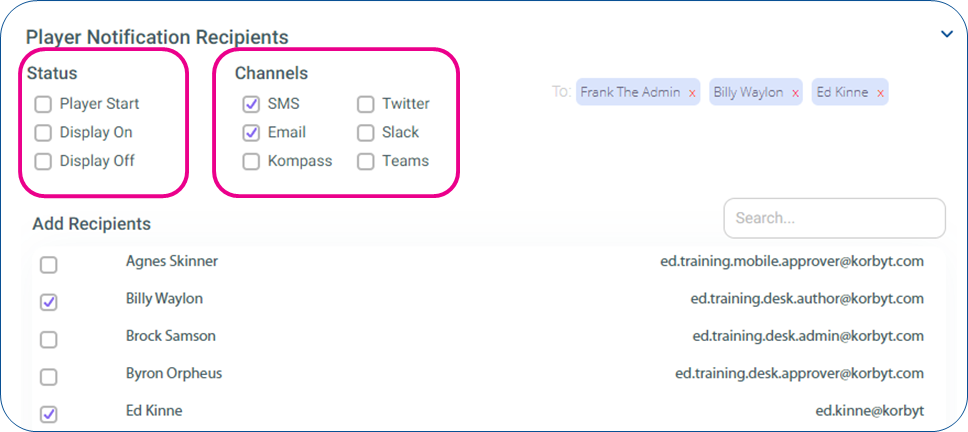
Once the Player Group is Created, on the lower right expand the Player Notification Recipients section
In this section you can specify which users get notified about the player, for what status changes, and through what communication channels
- A player status change to Inactive is present and not shows as an option
- The other status changes are optional
- The Email communication channel sends an email from “noreply@korbyt.com” through Korbyt email services
- All other communication channels will need to be configured in the Tenant Settings
 > Delivery setting up your accounts with those services
- All other communication channels will need to be configured in the Tenant Settings
The notification email that is sent will include the status change that triggered the alert, the player group name, and the name of the individual player.
